Digital marketing depends on data.
When someone visits a website, views a product, submits a form, adds an item to a cart, or completes a purchase, businesses need to measure those actions.
Traditionally, most website tracking has been handled through the visitor’s browser. This is commonly called client-side tracking.
Another approach is server-side tracking, where tracking data is sent to a server and processed there before being forwarded to analytics and advertising platforms.
Both approaches have their own role.
The real question is not simply which one is better. It is which tracking architecture fits your website, advertising strategy, and measurement requirements?
What Is Client-Side Tracking?
Client-side tracking means that tracking code runs in the user’s browser.
For example, when someone visits an ecommerce website, tools such as Google Analytics, Google Tag Manager, Meta Pixel, or other tracking scripts can run in the browser and collect information about what the visitor does.
The basic flow looks like this:
Website → Browser → Analytics / Advertising Platform
If a visitor views a product, adds it to the cart, or completes a purchase, the browser can send those events directly to the relevant platform.
Google describes client-side tagging as tags that execute on the user’s device, while server-side tagging executes tags on a server.
Example
A customer visits an online store.
They:
- View a product
- Add it to the cart
- Start checkout
- Complete the purchase
A client-side setup can send events for these actions directly from the browser.
This approach is relatively simple and remains an important part of modern analytics and advertising measurement.
What Is Server-Side Tracking?
Server-side tracking moves part of the data processing from the visitor’s browser to a server environment.
Instead of sending tracking information directly from the browser to every marketing platform, the browser can send the information to a server container.
The server can then process and forward the relevant information to destinations such as analytics and advertising platforms.
The basic flow becomes:
Website → Browser → Server → Analytics / Advertising Platforms
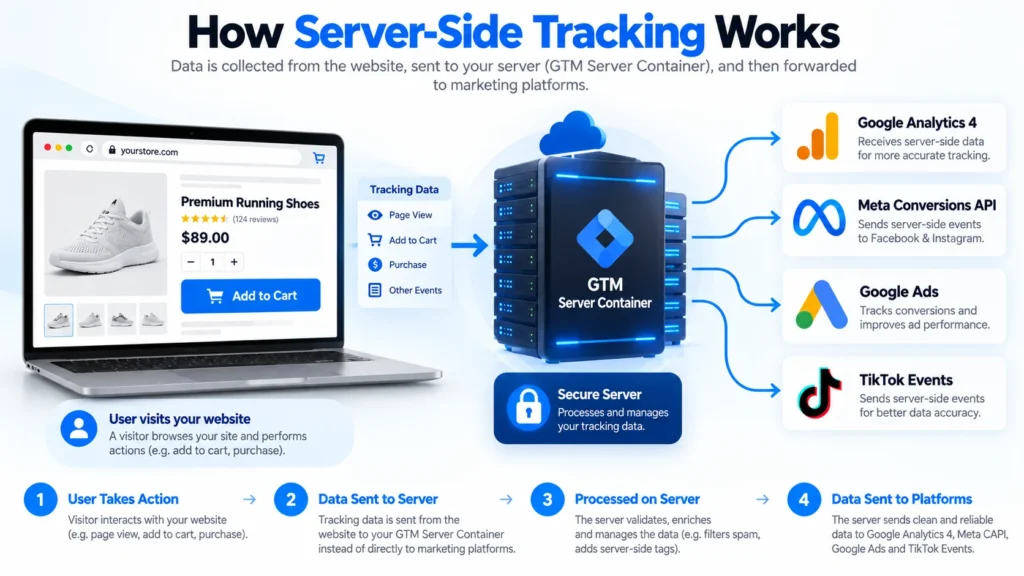
Google Tag Manager’s server-side architecture uses a server container that receives requests, processes event data, and then allows tags to send information to the required destinations.
Server-Side Tracking vs Client-Side Tracking: Main Differences
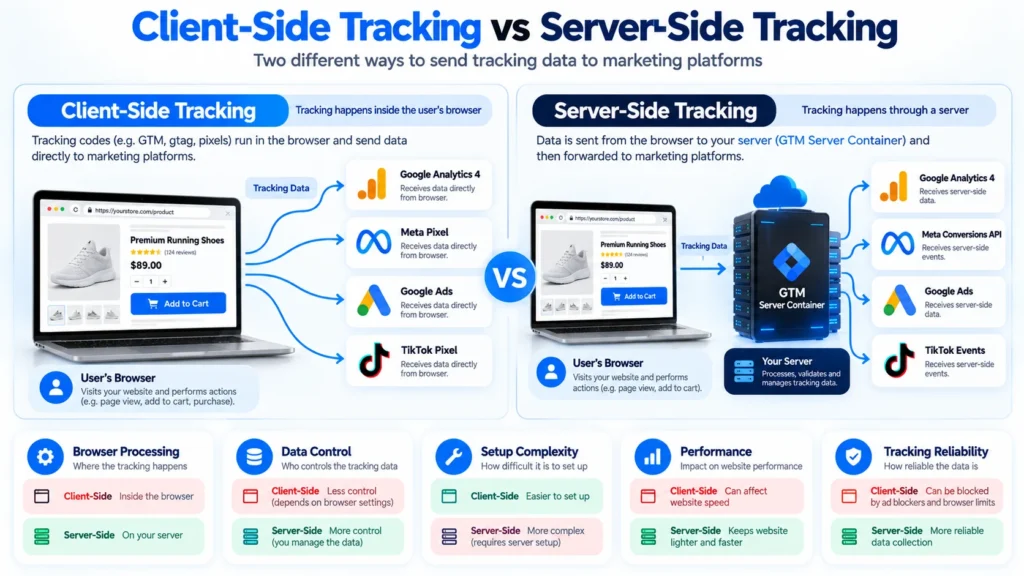
The simplest difference is where the tracking logic and data processing happen.
| Feature | Client-Side Tracking | Server-Side Tracking |
|---|---|---|
| Processing | User’s browser | Server |
| Browser dependency | Higher | Lower for downstream processing |
| Setup | Relatively simple | More technical |
| Server required | No dedicated tagging server | Yes |
| Data control | More limited | Greater control |
| Browser scripts | More | Can be reduced |
| Infrastructure cost | Usually lower | Server hosting has a cost |
| Maintenance | Easier | Requires additional management |
| Data routing | Browser sends to platforms | Server can process and route |
| Best suited for | Simple tracking setups | Advanced measurement architectures |
Neither approach is automatically right for every website.
How Client-Side Tracking Works
Imagine a visitor opens your website.
Your Google Tag Manager web container loads in their browser.
When the visitor performs an action, the relevant tag fires.
For example:
Visitor
↓
Website
↓
Browser
↓
GTM Web Container
↓
GA4 / Meta / Google Ads
This setup works well when the website needs to capture browser interactions such as:
- Page views
- Button clicks
- Product views
- Add to cart
- Form submissions
- Checkout interactions
- Purchases
Client-side tracking is particularly useful for actions that happen directly inside the webpage.
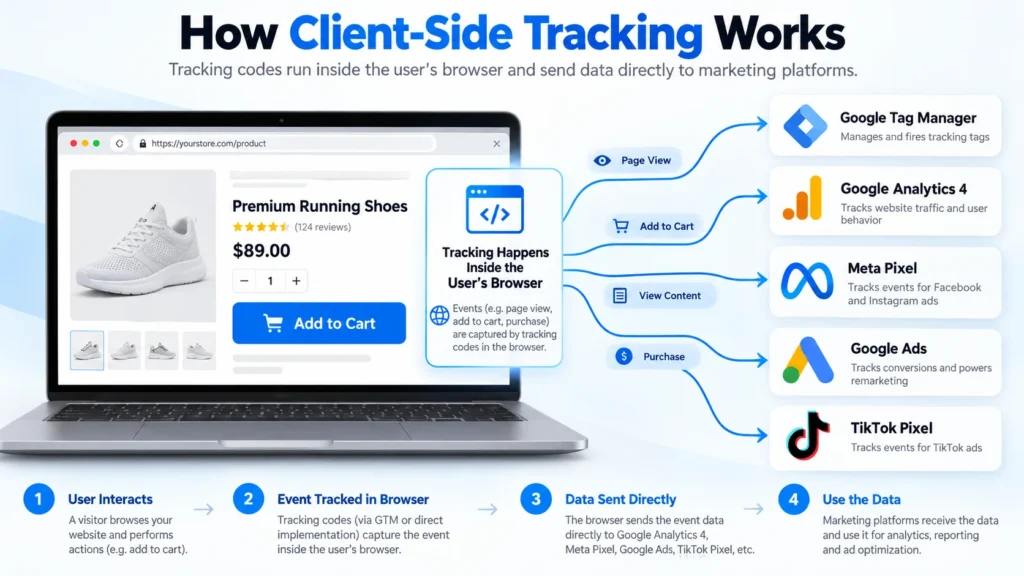
Google also notes that when tracking depends on what a user does on a webpage, some collection still needs to happen in the browser before data can be sent to a server container.
How Server-Side Tracking Works
With server-side tracking, the architecture adds a server processing layer.
A simplified setup looks like this:
Visitor
↓
Website
↓
Browser
↓
GTM Server Container
↓
┌──────────┬───────────┬────────────┐
↓ ↓ ↓
GA4 Meta Google Ads
The server receives the request and processes the event before forwarding the required information.
This provides greater control over what data is sent to different vendors.
Google describes server-side tagging as a layer between the user and marketing vendors, allowing businesses to control the data that is dispatched.
Why Do Businesses Use Client-Side Tracking?
Client-side tracking has several practical advantages.
Simple Implementation
For many websites, browser-based tracking is easier to install and maintain.
Lower Infrastructure Requirements
You generally do not need to maintain a separate server-side tagging environment.
Direct User Interaction Data
Browser tracking is useful for measuring interactions that happen directly on the webpage.
Lower Initial Cost
A basic client-side setup can often be implemented without additional server infrastructure.
For a small website with straightforward measurement requirements, a well-configured client-side setup may be completely appropriate.
Why Do Businesses Use Server-Side Tracking?
Server-side tracking becomes useful when businesses need greater control over their measurement architecture.
Greater Data Control
A server can act as an additional processing layer before information is sent to third-party platforms.
This can allow businesses to validate, transform, filter, or remove selected information before forwarding it.
Google specifically highlights improved control over data collection and vendor data routing as one of the reasons to use server-side tagging.
Reduced Browser-Side Processing
When multiple marketing tags are running directly in the browser, they can add JavaScript and network activity.
A server-side architecture can reduce some of this browser-side work.
Google notes that server-side tagging can reduce the amount of third-party code and requests handled by the user’s browser.
More Flexible Data Routing
Instead of allowing every vendor to receive information directly from the browser, the server can act as a central processing point.
For example:
One incoming event → Server → GA4 + Meta + Google Ads
The exact routing depends on the implementation.
Does Server-Side Tracking Replace Client-Side Tracking?
No.
This is one of the most important things to understand.
Server-side tracking does not automatically mean that all browser tracking should be removed.
Google explicitly explains that server-side tagging complements client-side tagging rather than simply replacing it.
Why?
Because the server does not automatically know everything happening inside a webpage.
For example, a server container cannot independently observe every:
- Button click
- Scroll
- Product interaction
- Form interaction
- Page interaction
The browser still needs to collect many of these actions and send the relevant information to the server.
This is why a hybrid tracking setup is common.
Client-Side + Server-Side Tracking
A hybrid setup combines both approaches.
The architecture may look like:
Website
↓
GTM Web
↓
GTM Server
↓
GA4
Meta
Google Ads
Other Platforms
The browser collects user interactions.
The server then processes and forwards selected data.
This approach can provide the benefits of browser-based interaction tracking while adding a server-side processing layer.
Google’s own GA4 server-side guidance describes hybrid collection as a common approach and recommends validating server-side measurement against the existing client-side setup before fully changing the architecture.
Server-Side Tracking and Meta Conversion API
One of the most common examples of server-side measurement is Meta Conversions API.
The Meta Pixel operates in the browser.
Conversions API allows businesses to send selected events from a server or other business system to Meta.
A common architecture is:
Browser → Meta Pixel
and
Server → Meta Conversions API
When both are used for the same events, proper deduplication is important so that the same conversion is not counted twice.
For ecommerce websites, this can involve events such as:
- ViewContent
- AddToCart
- InitiateCheckout
- Purchase
You can also read my related guide on Meta Conversion API to understand how server-side conversion events work and how they fit into a broader tracking setup.
Server-Side Tracking and GA4
GA4 can also be incorporated into a server-side tagging architecture.
A typical setup may look like:
GTM Web → GTM Server → GA4
The browser sends measurement requests to the server container, and the server processes and forwards the GA4 event.
Google’s documentation explains that the server container can receive GA4 requests, process them through the GA4 client, and dispatch them to Google Analytics.
This can be useful for businesses that want a more controlled measurement architecture.
However, it should be implemented carefully rather than simply moving every existing tag to a server without testing.
Which Tracking Method Is Better for Ecommerce?
There is no universal answer.
For a small ecommerce store with basic tracking requirements, client-side tracking may be sufficient.
For a larger ecommerce operation running multiple advertising platforms, a hybrid architecture may provide more control.
A typical ecommerce measurement structure might include:
Browser:
- View Item
- Add to Cart
- Begin Checkout
- Purchase
Server:
- Process selected events
- Validate parameters
- Forward events to platforms
- Handle server-side integrations
Important ecommerce parameters can include:
- Transaction ID
- Product ID
- Product name
- Price
- Quantity
- Currency
- Purchase value
The quality of these underlying data points is often more important than simply choosing client-side or server-side tracking.
Server-Side Tracking vs Client-Side Tracking for Privacy
Privacy is another important difference.
In a purely client-side architecture, the browser communicates directly with multiple third-party vendors.
In a server-side architecture, data can first reach a server controlled by the business.
This creates an opportunity to inspect and control the information before forwarding it.
Google explains that server-side tagging can allow businesses to validate, anonymize, or block certain requests before sending data to marketing partners.
However, server-side tracking does not automatically make a website privacy compliant.
Businesses still need appropriate consent, privacy practices, data handling, and configuration based on their applicable legal requirements.
Does Server-Side Tracking Improve Data Accuracy?
It can improve the robustness of a measurement setup, but it should not be described as a guarantee of 100% accurate data.
A tracking system can still have problems because of:
- Incorrect event configuration
- Missing parameters
- Broken data layers
- Duplicate events
- Incorrect transaction IDs
- Consent restrictions
- Attribution differences
- Platform reporting differences
- Implementation errors
For example, if a purchase event is incorrectly generated on the website, sending that same incorrect event through a server does not make the data correct.
Good server-side tracking starts with good data.
Common Client-Side Tracking Problems
Businesses may encounter issues such as:
Browser Restrictions
Some browsers and privacy settings can restrict certain forms of tracking.
Ad Blockers
Browser extensions can prevent some tracking scripts from loading.
Too Many Scripts
A website with numerous third-party scripts can increase browser-side processing.
Data Exposure
Every vendor receiving browser-side data has its own request and processing path.
These issues are among the reasons businesses consider server-side architectures.
Common Server-Side Tracking Problems
Server-side tracking also introduces additional complexity.
Hosting Costs
A server-side container needs infrastructure to run.
Technical Setup
The implementation is more complicated than simply installing browser tags.
Maintenance
Server environments need monitoring, updates, and troubleshooting.
Incorrect Event Routing
If the server configuration is wrong, events may not reach the intended destination.
Duplicate Events
Using browser and server events together requires proper deduplication.
Poor Data Architecture
A server cannot fix an incorrectly structured data layer by itself.
Google’s server-side documentation also notes that server-side tagging requires a server environment and that infrastructure planning and costs need to be considered.
Which One Should Your Business Use?
The answer depends on your business.
Client-Side Tracking May Be Enough If:
- You have a small website
- Your tracking requirements are simple
- You use only a few marketing platforms
- You have limited technical resources
- You do not need advanced server-side processing
Server-Side Tracking May Be Worth Considering If:
- You run significant paid advertising
- You use multiple advertising platforms
- You have complex ecommerce tracking
- You need greater control over data routing
- You have tracking discrepancies
- You need an advanced measurement architecture
A Hybrid Setup May Make Sense If:
You want to continue collecting browser interactions while adding a server-side layer for processing and forwarding selected events.
For many advanced marketing setups, this is the architecture worth evaluating rather than completely removing client-side tracking.
How to Decide Which Setup You Need
Before implementing server-side tracking, audit your existing setup.
Check:
- What events are currently being tracked?
- Are important conversions missing?
- Are duplicate conversions appearing?
- Is your data layer correctly structured?
- Which advertising platforms are you using?
- How much conversion data do you generate?
- Do you need server-side integrations?
- What privacy and consent requirements apply?
- Can your business support the additional infrastructure?
Only after answering these questions should you decide whether a server-side setup is necessary.
Server-Side Tracking Service
If you need a more advanced tracking architecture, my Server-Side Tracking service in Bangladesh focuses on server-side GTM, GA4, Meta Conversions API, Google Ads conversion tracking, ecommerce tracking, and related measurement implementations.
The goal should not simply be to install a server container.
The goal is to build a tracking system where your website, data layer, browser tracking, server-side processing, analytics, and advertising platforms work together correctly.
Final Thoughts
The difference between server-side tracking and client-side tracking is mainly about where tracking data is collected, processed, and forwarded.
Client-side tracking remains important because the browser is where many user interactions happen.
Server-side tracking adds another layer that can provide greater control over data processing and routing while potentially reducing some browser-side work.
For many businesses, the answer is not choosing one and completely abandoning the other.
A properly planned client-side + server-side tracking architecture can combine browser-based interaction measurement with server-side processing.
The right choice ultimately depends on your website, business model, advertising platforms, conversion volume, technical requirements, and data strategy.