

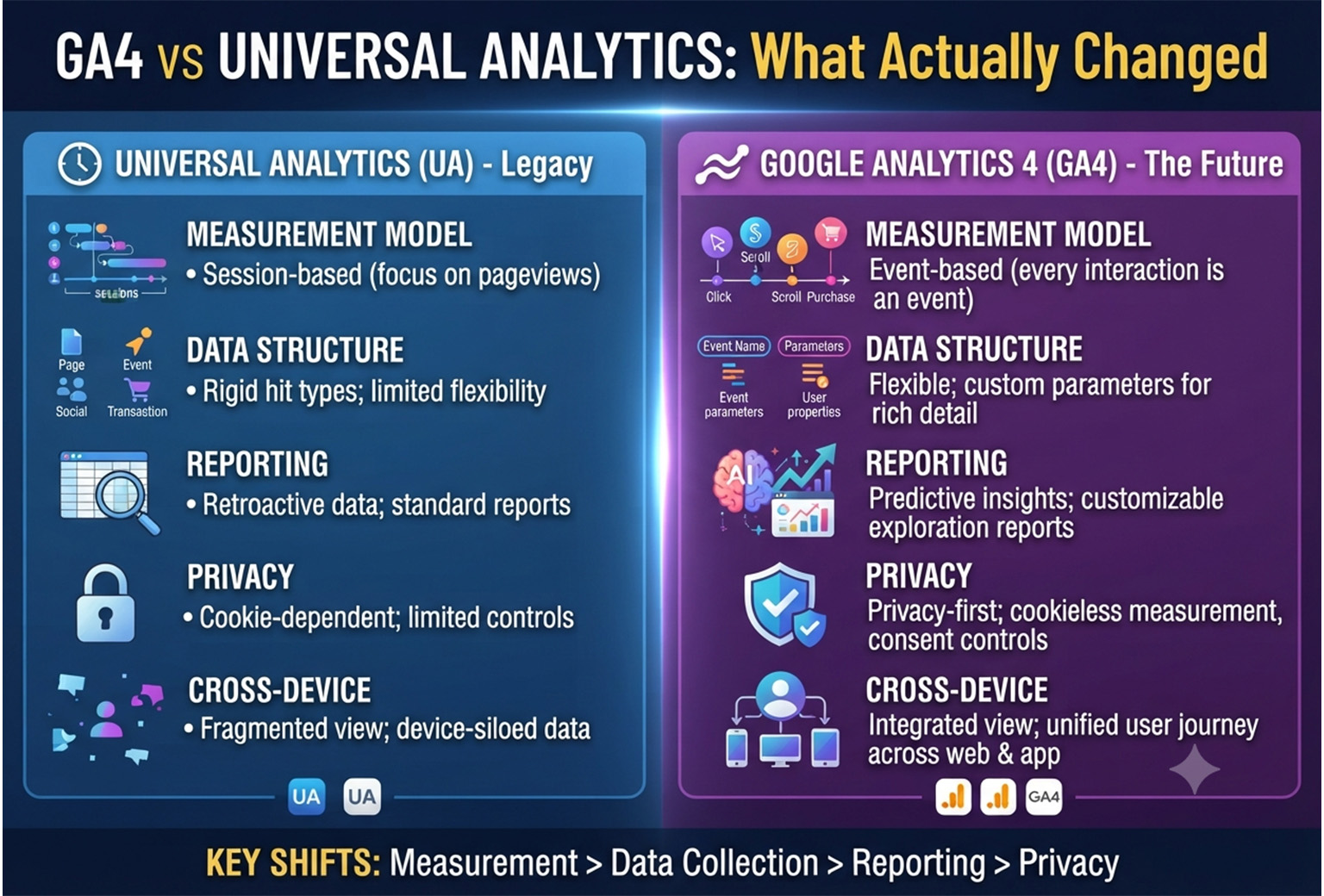
For years, Universal Analytics (UA) was the standard tool for measuring website traffic and user behavior. However, as privacy regulations evolved and user journeys became more complex across websites and mobile apps, Google introduced Google Analytics 4 (GA4) as the next generation of analytics.
Unlike Universal Analytics, GA4 is built around an event based data model, cross platform tracking, and privacy focused measurement. If you’ve recently migrated to GA4 or are still learning the differences, this guide explains what actually changed and why it matters.
What Is Universal Analytics?
Universal Analytics (UA) was Google’s previous analytics platform that primarily tracked user interactions through sessions and pageviews.
It relied heavily on:
- Cookies
- Session based reporting
- Pageview tracking
- Goal conversions
- Bounce Rate
UA worked well for traditional websites but struggled to accurately measure modern customer journeys across multiple devices and platforms.
What Is Google Analytics 4 (GA4)?
Google Analytics 4 (GA4) is Google’s latest analytics platform designed to measure user interactions across websites and mobile apps using an event driven model.
Instead of focusing on sessions, GA4 records every meaningful interaction as an event.
Examples include:
- page_view
- scroll
- click
- view_item
- add_to_cart
- begin_checkout
- purchase
- generate_lead
This approach provides a more flexible and complete understanding of user behavior.

GA4 vs Universal Analytics: Quick Comparison
| Feature | Universal Analytics | GA4 |
|---|---|---|
| Data Model | Session Based | Event Based |
| Platforms | Website Only | Website + Mobile Apps |
| Measurement | Pageviews & Sessions | Events & Parameters |
| Bounce Rate | Default Metric | Replaced by Engagement Rate (Bounce Rate later reintroduced as a derived metric) |
| Reporting | Standard Reports | Flexible Reports & Explorations |
| Machine Learning | Limited | Advanced AI Insights |
| Privacy | Cookie Dependent | Privacy Focused |
| BigQuery Export | Paid Version | Free for Everyone |
| Predictive Metrics | No | Yes |
| Cross Device Tracking | Limited | Built In |
The Biggest Changes in GA4
1. Event Based Tracking
The biggest difference is the data model.
Universal Analytics organized data into:
- Users
- Sessions
- Pageviews
GA4 tracks almost everything as an event.
For example:
| User Action | GA4 Event |
|---|---|
| Page Visit | page_view |
| Scroll | scroll |
| Video Play | video_start |
| File Download | file_download |
| Purchase | purchase |
This gives marketers much greater flexibility when analyzing user behavior.
2. Sessions Are Less Important
UA focused heavily on sessions.
GA4 still records sessions, but its primary focus is the individual events users perform during their journey.
This makes it easier to analyze complex customer paths across multiple visits and devices.
3. Enhanced Measurement
One of GA4’s best features is Enhanced Measurement.
Without adding extra code, GA4 can automatically track:
- Page views
- Scrolls
- Outbound clicks
- Site search
- Video engagement
- File downloads
In Universal Analytics, many of these interactions required custom event tracking.
4. Engagement Replaces Bounce Rate
Universal Analytics used Bounce Rate to measure single page visits without interaction.
GA4 introduces Engaged Sessions, which generally include sessions that last longer than 10 seconds, have at least one conversion event, or include two or more page or screen views.
Key engagement metrics include:
- Engaged Sessions
- Engagement Rate
- Average Engagement Time
These metrics provide a more meaningful picture of user activity than bounce rate alone.
5. Cross Platform Tracking
GA4 can measure users across:
- Websites
- Android Apps
- iOS Apps
This creates a unified customer journey that Universal Analytics could not easily provide.
6. Better Privacy Controls
Privacy regulations continue to evolve worldwide.
GA4 includes features designed for modern privacy requirements, including:
- Consent Mode support
- IP anonymization by default
- Data retention controls
- Cookieless measurement where available
- Better handling of missing data through modeling
These capabilities help organizations adapt to changing privacy expectations.
7. Predictive Analytics
GA4 uses machine learning to generate predictive metrics such as:
- Purchase Probability
- Churn Probability
- Predicted Revenue
Businesses can use these insights to build smarter audiences for advertising and remarketing.
8. BigQuery Integration
One of GA4’s biggest advantages is free BigQuery export.
Benefits include:
- Raw event data
- SQL analysis
- Dashboard creation
- Data warehouse integration
- Advanced reporting
This feature previously required the paid version of Universal Analytics.
9. Flexible Reporting
Universal Analytics offered mostly predefined reports.
GA4 introduces Explorations, allowing users to create custom analyses such as:
- Funnel Analysis
- Path Exploration
- Cohort Analysis
- Segment Overlap
- User Lifetime Analysis
These reports help uncover insights that standard reports may not reveal.
10. Conversion Tracking
Universal Analytics used Goals for conversions.
GA4 replaces Goals with Conversion Events.
You simply mark important events, such as:
- purchase
- generate_lead
- sign_up
- submit_form
as conversions.
This simplifies setup while making conversion tracking more flexible.
Why Google Replaced Universal Analytics
Google developed GA4 to address several limitations of Universal Analytics:
- Better measurement across websites and apps
- Stronger privacy protections
- Improved machine learning
- More flexible reporting
- Event based data collection
- Future ready analytics architecture
The way people interact with digital products has changed, and GA4 is designed to reflect those changes.
Should You Still Use Universal Analytics?
No.
Universal Analytics has been retired, and it no longer processes new data. GA4 is now Google’s primary analytics platform for measuring website and app performance.
If you have historical UA data that you need, keep any exported reports or backups because new data will not be added.
Best Practices for GA4
To get the most from GA4:
- Configure Enhanced Measurement.
- Set up meaningful conversion events.
- Link GA4 with Google Ads.
- Connect BigQuery for advanced analysis.
- Use Google Tag Manager for easier event management.
- Create custom audiences for remarketing.
- Regularly review DebugView and Realtime reports during implementation.
Final Thoughts
Google Analytics 4 is more than just an updated version of Universal Analytics. It represents a fundamental shift in how digital analytics works. By moving from a session based model to an event based approach, GA4 provides deeper insights into user behavior, supports modern privacy standards, and offers more advanced reporting and predictive capabilities.
For businesses that want accurate, future ready analytics, GA4 is now the standard. Learning its event model, engagement metrics, and reporting tools will help you make better marketing decisions and gain a clearer understanding of how users interact with your website or app.
Official Resources
Need help with GA4 and Google Tag Manager?
I am Rubel Hasan Rokib, a data-driven digital marketer based in Bangladesh. Send me your website or ad account details on WhatsApp and I will reply with a clear plan.








2 Comments