

Most TikTok campaigns that “do not work” have the same hidden problem: TikTok cannot see the sales. The ads are fine, the product is fine, but the tracking is half broken, so the algorithm optimizes on guesses. A clean TikTok Pixel and Events API setup fixes that, and it is the first thing I check in every TikTok ad account I audit.
This guide walks you through the whole setup in plain English: which events matter, how the Pixel and Events API work together, how to stop double counting, and how to test everything before you spend a single taka on ads.
Quick Answer
To track TikTok Ads properly, install the TikTok Pixel on your website for browser events and connect the Events API to send the same events from your server. Use the same event ID on both so TikTok can remove duplicates, then confirm everything in TikTok Events Manager before launching campaigns.
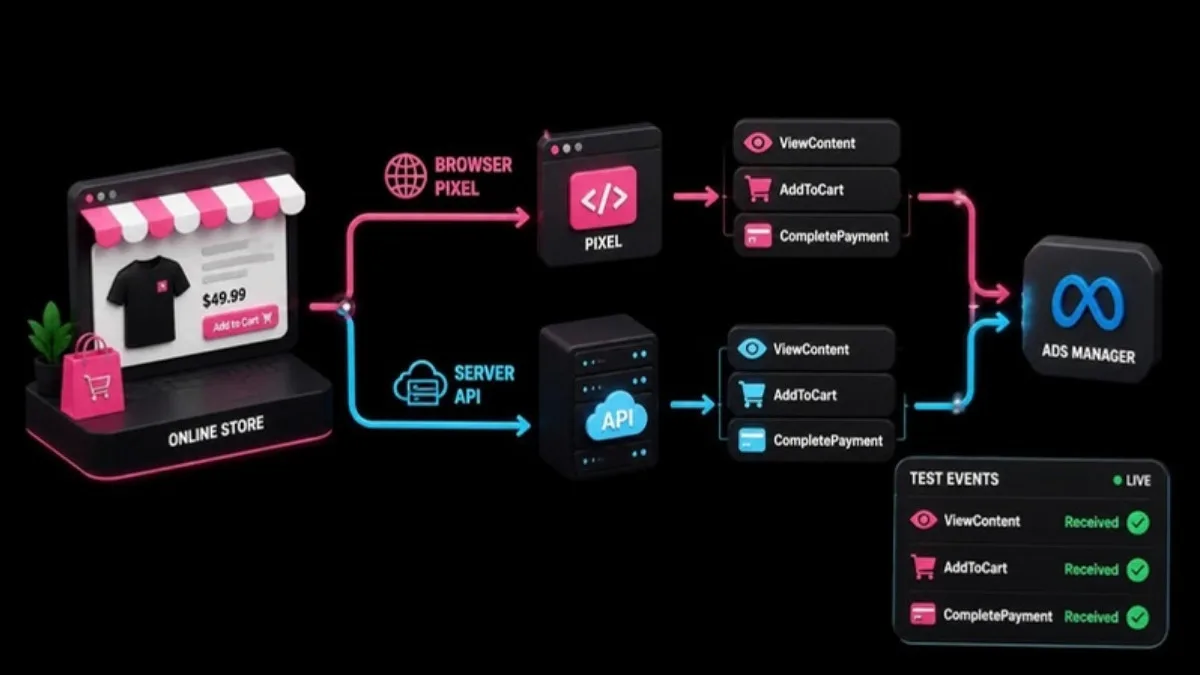
- Pixel tracks actions in the visitor’s browser.
- Events API sends the same actions from your server, so ad blockers and browser limits miss fewer conversions.
- Event ID must match on both sides for deduplication.
- Track at least ViewContent, AddToCart, InitiateCheckout and CompletePayment for e-commerce.
- Always test in Events Manager before you launch.
Why the Pixel Alone Is Not Enough
The TikTok Pixel is a piece of JavaScript that runs in the visitor’s browser. When someone views a product or completes a purchase, the Pixel tells TikTok. The problem is that browsers are getting stricter. Ad blockers, privacy settings, slow mobile connections in Bangladesh and in-app browsers can all stop the Pixel from firing.
The Events API solves this by sending the same events directly from your server to TikTok. Because it does not depend on the browser, it catches conversions the Pixel misses. TikTok recommends using both together, and in my experience accounts that run both see more attributed conversions and a steadier cost per result.
Events You Should Track
Do not track everything. Track the steps of your buying journey so TikTok has clear signals to optimize on.
| Event | When it fires | Why it matters |
|---|---|---|
| ViewContent | A product or service page loads | Builds audiences of interested visitors |
| AddToCart | Someone adds a product to the cart | Strong buying intent, useful for smaller budgets |
| InitiateCheckout | Checkout page opens | Good optimization event when purchases are still low |
| CompletePayment | Order is placed | Your main optimization event for sales |
| SubmitForm / Contact | A lead form or WhatsApp click | Main event for service businesses |
Step-by-Step: TikTok Pixel and Events API Setup
Step 1: Create the Pixel in TikTok Events Manager
In TikTok Ads Manager, open Assets, then Events, then Web Events. Create a new web event source and give it a clear name, for example your store name. Choose the option to use both the Pixel and the Events API when TikTok asks how you want to connect.
Step 2: Install the Pixel on your website
You have three common options. Shopify and WooCommerce have official or partner integrations that install the Pixel and standard events for you. On a custom site, the cleanest method is Google Tag Manager, where you add the TikTok Pixel base code and then create one tag per event. Avoid pasting the base code into the theme and also adding it through a plugin, because that creates duplicate events.
Step 3: Send the correct parameters
For purchase events, always send the value and currency, for example 1500 and BDT. Without a value, TikTok cannot optimize for revenue and your ROAS reporting will be empty. Add content IDs if you plan to run catalog or shopping ads later.
Step 4: Connect the Events API
Generate an access token in Events Manager. Then connect the Events API through your platform integration, a partner tool, or a server-side Google Tag Manager container. Server events should include matching data such as hashed email or phone number, IP address and user agent, so TikTok can link the event to a user.
Step 5: Set up deduplication with event_id
If both the Pixel and the Events API send the same purchase, TikTok needs to know it is one sale, not two. You do this by sending the same event_id on both, usually the order number. When the IDs match, TikTok keeps one and discards the duplicate.
Step 6: Test before you launch
Use the Test Events tool in Events Manager. Open your website, add a product to the cart and place a test order. You should see each event arrive from both the browser and the server, with the same event ID. Check that the value and currency are correct.
Common Mistakes That Break TikTok Tracking
- Installing the Pixel twice, once in the theme and once through a plugin.
- Firing CompletePayment on the checkout page instead of the thank-you page.
- Sending purchase events without value or currency.
- Using different event IDs on the Pixel and Events API, which causes double counting.
- Forgetting to test again after changing the theme or checkout plugin.
If your campaigns seem stuck, bad tracking is often the reason. My guide on the TikTok Ads learning phase explains why TikTok needs enough real conversions to stabilize, and you cannot reach that number if half the sales are invisible.
TikTok Pixel and Events API FAQ
Do I need both the TikTok Pixel and the Events API?
Yes, for best results. The Pixel captures browser events and the Events API captures server events that browsers miss. Together they give TikTok more complete data.
What is event_id in TikTok tracking?
It is a unique ID, usually the order number, sent with the same event from both the Pixel and the Events API so TikTok can remove duplicates.
Which event should I optimize for?
Optimize for CompletePayment if you have enough daily orders. If orders are low, start with InitiateCheckout or AddToCart, then switch to purchases as volume grows.
Can I set up the TikTok Events API on WooCommerce?
Yes. You can use a TikTok integration plugin, a partner tool, or server-side Google Tag Manager to send events from WooCommerce to the Events API.
How do I know my TikTok Pixel is working?
Open Events Manager, use the Test Events tool, and complete a test action on your site. Each event should appear with the correct parameters.
Final Thoughts
Good TikTok Ads start with good data. Set up the Pixel and Events API together, match your event IDs, send real values and test everything once before launch. If you are new to the platform, my TikTok Ads setup guide for Bangladesh covers the account side, and the complete TikTok Ads guide covers campaigns.
Official Resources
Need help with TikTok Pixel and Events API setup?
I am Rubel Hasan Rokib, a data-driven digital marketer based in Bangladesh. Send me your website or ad account details on WhatsApp and I will reply with a clear plan.



2 Comments