


When people move to server-side tracking, they often stop at “the container works”. But one of the biggest benefits only appears when the server container runs on your own subdomain, such as data.yoursite.com, instead of a generic cloud address. That is what turns third-party style tracking into first-party tracking.
In this guide I explain what first-party cookies mean in a server-side setup, why the subdomain matters, and how to configure it step by step.
Quick Answer
In server-side tracking, a first-party setup means your tracking server runs on a subdomain of your own website, for example data.yoursite.com. Requests then look like they come from your own domain, cookies can be set as first-party by the server with longer lifetimes than many browsers allow for script-set cookies, and fewer requests are blocked. You set it up by adding DNS records that point the subdomain to your server container host.
- Run the server container on your own subdomain.
- Server-set cookies are first-party and more durable.
- Fewer tracking requests are blocked.
- Setup is mainly a DNS record plus container settings.
- Consent rules still apply.
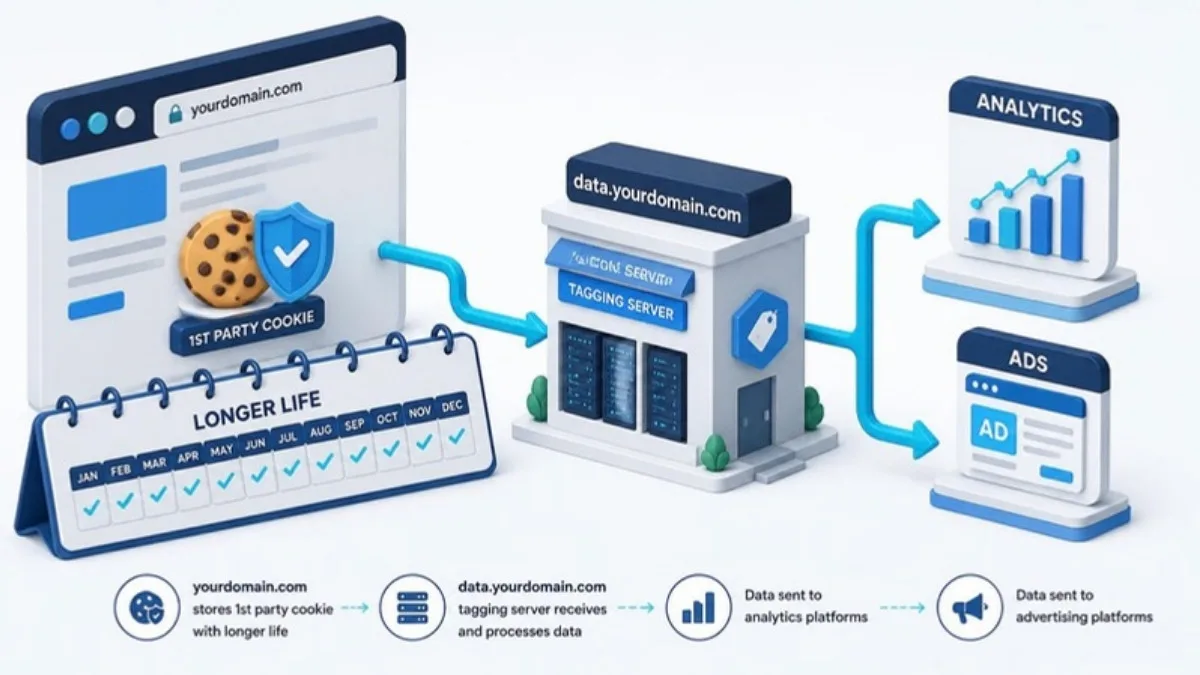
Third-Party vs First-Party Tracking
Browsers treat cookies and scripts from other domains with more suspicion. Safari, for example, limits the lifetime of cookies set by JavaScript, and ad blockers often block requests to well-known tracking domains. When your tracking requests go to a subdomain of your own site, they are part of your first-party context.
| Default cloud URL | Your own subdomain | |
|---|---|---|
| Domain context | Third-party style | First-party |
| Cookie set by | Mostly browser scripts | Server (HTTP header) |
| Cookie lifetime | Often shortened by browsers | Usually longer |
| Blocking risk | Higher | Lower |
Step by Step: Set Up a Custom Subdomain
- Choose a neutral subdomain name, for example data or metrics, rather than tracking or analytics.
- In your hosting provider for the server container, add the custom domain and copy the DNS records it gives you.
- Add those records in your DNS manager (for example Cloudflare or your domain registrar).
- Wait for DNS and SSL to become active.
- Update your web GTM container so the GA4 configuration sends data to the new server URL.
- Test with GTM Preview in both the web and server containers.
Things to Watch
- Keep consent logic in place. First-party does not mean consent-free.
- Use the same subdomain for GA4, Meta, TikTok and other platforms to keep things simple.
- Monitor hosting usage so the container does not stop silently.
- Avoid mistakes I list in 7 server-side tracking mistakes.
If you are still deciding whether you need any of this, start with server-side vs client-side tracking.
First-Party Server-Side Tracking FAQ
What is a first-party subdomain in server-side GTM?
It is a subdomain of your own website, like data.yoursite.com, that points to your server container so tracking runs in your first-party context.
Do first-party cookies last longer?
Cookies set by the server through HTTP headers on your own domain are usually treated more favourably by browsers than cookies set by scripts.
Does a custom subdomain stop ad blockers?
It reduces blocking for many requests, but it does not guarantee that nothing is blocked.
Do I still need consent with first-party tracking?
Yes. Privacy laws and consent choices still apply.
Is the subdomain setup difficult?
It usually takes a few DNS records and a short configuration in your container host and GTM.
Final Thoughts
A custom subdomain is one of the simplest upgrades with the biggest effect in a server-side setup. Set it up once, keep consent in place and monitor your container. My server-side tracking guide for Bangladesh covers the full picture.
Official Resources
Need help with first-party server-side tracking?
I am Rubel Hasan Rokib, a data-driven digital marketer based in Bangladesh. Send me your website or ad account details on WhatsApp and I will reply with a clear plan.