

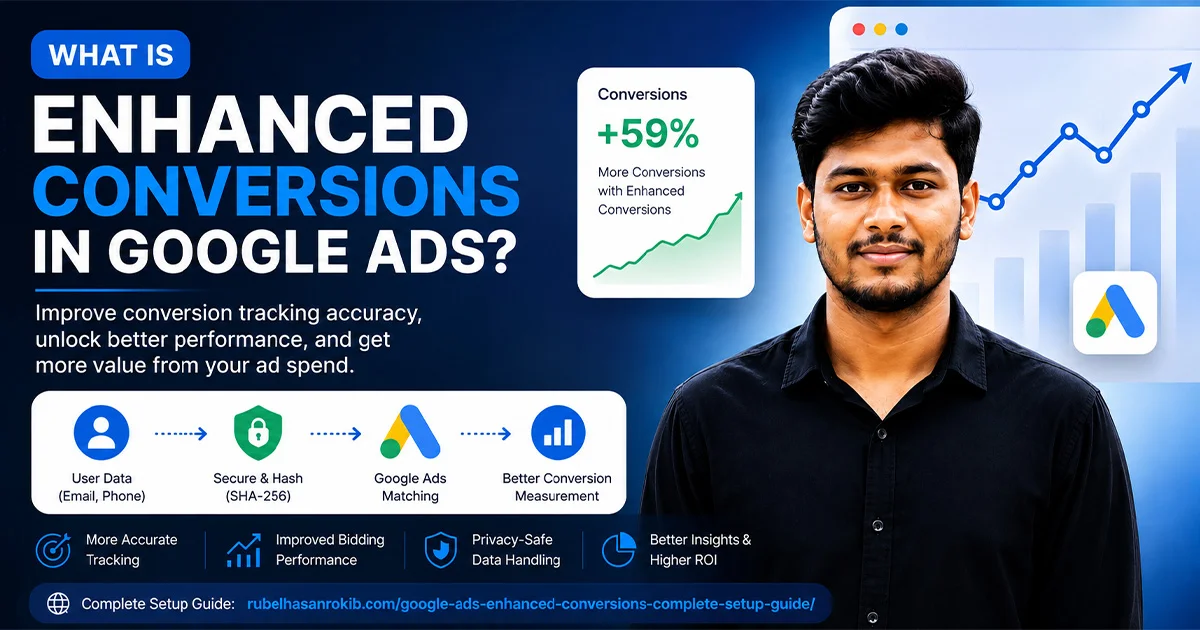
Enhanced conversions is a Google Ads feature designed to improve the accuracy of conversion measurement by using securely hashed first party customer data. It can help advertisers better understand which ad interactions lead to conversions and make more informed bidding decisions.
If you are running Google Ads and your conversion data does not always match the actual number of leads or sales, enhanced conversions can help improve the accuracy of your measurement.

Google Ads Enhanced Conversions is designed to supplement your existing conversion tracking with privacy safe, first party customer data. When a customer completes an important action such as making a purchase, submitting a lead form, or signing up, information such as an email address or phone number can be securely processed and sent to Google in hashed form. Google can then use that information to improve conversion measurement and attribution.
For businesses that depend on accurate conversion data, this can make a significant difference because better measurement gives Google Ads better signals for optimization and bidding.
In this guide, we will explain what enhanced conversions are, how Google Ads Enhanced Conversions work, enhanced conversions for leads, how to enable the feature, and how to check whether your implementation is working correctly.
In This Guide
- Why Are Enhanced Conversions Important?
- Enhanced Conversions vs Traditional Conversion Tracking
- What Are Enhanced Conversions for Leads?
- What Is the Difference Between Enhanced Conversions for Web and Leads?
- How to Turn On Enhanced Conversions in Google Ads
- How to Set Up Enhanced Conversions with Google Tag Manager
- What Customer Data Can Enhanced Conversions Use?
- How to Check If Enhanced Conversions Are Working
- Common Enhanced Conversions Problems
- Should You Use Enhanced Conversions?
- Enhanced Conversions and Data Driven Google Ads
- Why Proper Implementation Matters
- Need Help With Enhanced Conversions?
- Frequently Asked Questions
- Final Thoughts
What Are Enhanced Conversions?
Enhanced conversions is a Google Ads feature that can improve the accuracy of conversion measurement and support more effective bidding.
Instead of relying only on traditional conversion signals, enhanced conversions can use first party customer information collected during a conversion. Depending on the implementation, this can include information such as:
- Email address
- Phone number
- Name
- Address
The information is normalized and hashed using SHA 256 before it is sent to Google. Google then uses the hashed information for matching and attribution in a privacy safe way.
The important point is that enhanced conversions do not replace your existing Google Ads conversion tracking. They supplement it with additional first party data to improve measurement.
How Do Google Ads Enhanced Conversions Work?
The basic process is relatively simple.
Imagine someone clicks your Google advertisement and visits your website.
They fill out a form using their email address and phone number.
The conversion tracking system captures the relevant first party information. The data is normalized and securely hashed before being sent to Google.
Google can then compare the hashed information with its own signed in data to help identify conversions that may otherwise be difficult to attribute.
In simplified form:
Google Ad Click → Website Visit → Customer Conversion → First Party Data → SHA 256 Hashing → Google Matching → Improved Conversion Measurement
Google explains that enhanced conversions can improve the amount of observable conversion data available for measurement and can also support Google AI powered solutions such as modeled conversions and bidding optimization.
Why Are Enhanced Conversions Important?
Traditional conversion tracking can lose some signals because of browser restrictions, privacy changes, cookie limitations, and other measurement challenges.
That means you may have a situation where your business actually received 100 conversions, while Google Ads can only directly associate a portion of those conversions with ad interactions.
Enhanced conversions can provide additional first party signals that help Google improve its measurement.
This is particularly useful when you are optimizing campaigns based on conversions.
Better conversion measurement can help you:
- Understand campaign performance more accurately
- Improve conversion reporting
- Provide stronger signals for automated bidding
- Better understand the relationship between ad interactions and conversions
- Reduce some of the measurement gaps created by modern privacy and browser environments
Google states that enhanced conversions can improve conversion measurement and support more powerful bidding.
Enhanced Conversions vs Traditional Conversion Tracking
Traditional Google Ads conversion tracking usually measures an action through a conversion tag or other configured tracking method.
Enhanced conversions add another layer of first party customer data to that measurement.
| Traditional Conversion Tracking | Enhanced Conversions |
|---|---|
| Measures configured conversion events | Supplements conversion events with first party data |
| Relies on standard conversion signals | Uses additional customer provided signals |
| Can face measurement limitations | Can improve observable conversion measurement |
| Useful for basic tracking | Useful for more accurate measurement |
| Works with Google Ads conversion tracking | Works alongside existing conversion tracking |
Enhanced conversions should therefore be viewed as an improvement to your measurement infrastructure, not as a completely separate replacement for Google Ads conversion tracking.
What Are Enhanced Conversions for Leads?
Enhanced conversions for leads is designed for businesses that generate leads and later determine their quality or value outside the website.
For example, suppose someone submits a form requesting a quotation.
The initial form submission may be tracked as a lead. Later, your sales team may contact that person and determine that the lead became a qualified customer.
Enhanced conversions for leads can use customer provided information to help connect those offline outcomes back to Google Ads.
Google describes enhanced conversions for leads as an upgraded approach to offline conversion import that uses user provided data to improve measurement and bidding performance.
This makes it particularly useful for:
- Service businesses
- B2B companies
- Real estate businesses
- Education businesses
- Lead generation websites
- Agencies
- Businesses with CRM based sales processes
For example:
Google Ad → Lead Form → CRM → Qualified Lead → Converted Customer
Enhanced conversions for leads can help connect the later stages of this journey with the original advertising interaction.
What Is the Difference Between Enhanced Conversions for Web and Leads?
The main difference is where and how the conversion outcome is measured.
Enhanced Conversions for Web
This is primarily useful when the conversion happens on your website.
Examples include:
- Ecommerce purchases
- Sign ups
- Registration
- Form submissions
- Website enquiries
First party customer information can be captured around the website conversion and securely sent to Google in hashed form.
Enhanced Conversions for Leads
This is designed for businesses where the lead may be generated online but the final business outcome happens later.
For example:
Website Lead → Sales Call → Qualified Lead → Customer
The later conversion data can be imported through supported methods such as Google Ads Data Manager or API connections.
Google has also been updating the enhanced conversions experience in 2026. Web and leads functionality is being moved toward a unified setting, with Google Ads accepting user provided data from website tags, Data Manager and API connections.
How to Turn On Enhanced Conversions in Google Ads
Google Ads has been updating the interface and settings during 2026, so the exact menu labels may differ depending on your account.
At the account level, Google currently provides enhanced conversions settings through the Goals area.
A typical setup flow is:
- Sign in to your Google Ads account.
- Open Goals.
- Go to Conversions or Settings, depending on your interface.
- Find the Enhanced conversions section.
- Turn on enhanced conversions.
- Review and accept Google’s customer data terms if required.
- Choose or configure the appropriate implementation method.
- Complete your website or CRM implementation.
- Test the conversion.
- Monitor the diagnostics and conversion reporting.
Google’s current account level documentation confirms that enhanced conversions can be enabled at the account level, while the exact setup can depend on your existing conversion actions and implementation.
If you are implementing enhanced conversions through Google Tag Manager, Google provides a dedicated setup process for configuring user provided data with your conversion tracking.
How to Set Up Enhanced Conversions with Google Tag Manager
Google Tag Manager is a popular option when you want more control over your tracking setup.
A basic implementation involves:
Google Ads Conversion Tracking + Google Tag Manager + User Provided Data
Before implementation, you need to make sure the required customer data is actually available when the conversion occurs.
For example, an ecommerce website may have:
- Customer email
- Phone number
- Order ID
- Transaction value
- Currency
A lead generation website may have:
- Phone number
- Name
- Lead ID
Google recommends that the relevant first party data be available on the page or event where the conversion tracking tag fires.
The exact implementation depends on your website platform and data structure.
For a complete implementation walkthrough, you can read my detailed guide:
Google Ads Enhanced Conversions: Complete Setup Guide
What Customer Data Can Enhanced Conversions Use?
Depending on your implementation and the conversion type, enhanced conversions may use first party information such as:
- Email address
- Phone number
- First name
- Last name
- Home address
Google processes applicable customer information using hashing and matching mechanisms designed to protect user privacy.
Data handling must also comply with Google’s customer data policies and applicable privacy requirements.
If your business operates in regions where consent requirements apply, your tracking implementation should also be designed with the appropriate consent framework.
How to Check If Enhanced Conversions Are Working
Setting up the feature is only half the job.
You should always verify that the implementation is actually working.
Google recommends testing your conversion implementation and reviewing diagnostics. For enhanced conversions for leads, Google provides a diagnostics report that can help identify implementation issues and show the impact of enhanced conversions.
You can also use Google Tag Assistant to test whether your conversion tags are firing correctly.
Things to check
1. Conversion tag
Make sure your Google Ads conversion tag fires when the intended conversion happens.
2. Customer data
Verify that the required first party data is available at the time of conversion.
3. Data formatting
Email and phone data need to be correctly normalized before hashing. Google provides specific formatting requirements for these fields.
4. Diagnostics
Review the Enhanced Conversions diagnostics available in Google Ads.
5. Conversion reporting
Allow enough time for Google Ads reporting and attribution data to update. Conversion reporting can have some processing delay.
Common Enhanced Conversions Problems
Even when enhanced conversions are enabled, the implementation can still have problems.
Some common issues include:
Incorrect customer data
If email or phone data is not available when the conversion fires, Google may not receive the required signal.
Incorrect formatting
Customer information needs to be normalized correctly before hashing.
Conversion tag not firing
If the original Google Ads conversion tag is not working, enhanced conversions cannot fix the underlying conversion tracking problem.
Incorrect GTM configuration
Variables, triggers, tags, or user provided data settings may be configured incorrectly.
Missing consent configuration
Businesses operating under applicable privacy and consent requirements need to make sure their tracking setup follows the relevant policies.
No testing
A common mistake is enabling enhanced conversions and assuming the setup is complete without testing the actual conversion flow.
Should You Use Enhanced Conversions?
If you are actively running Google Ads and depend on accurate conversion measurement, enhanced conversions are worth considering.
They are particularly useful when you have meaningful first party customer data and want to improve the quality of your conversion measurement.
For ecommerce businesses, this can be useful for measuring purchases.
For lead generation businesses, enhanced conversions for leads can become especially valuable when leads are later qualified or converted through a CRM or sales process.
The important thing is to implement it correctly rather than simply turning on the setting and assuming everything is working.
Enhanced Conversions and Data Driven Google Ads
Modern Google Ads is increasingly dependent on high quality conversion signals.
Your campaign can have a strong creative, competitive offer and good targeting, but if Google receives incomplete or unreliable conversion data, automated bidding has less information to work with.
That is why the tracking layer matters.
A strong measurement system can connect:
Google Ads → Website → Conversion Tracking → First Party Data → Enhanced Conversions → Analytics → Optimization
This creates a much stronger foundation for performance marketing.
Why Proper Implementation Matters
Enhanced conversions are not simply a checkbox inside Google Ads.
A reliable implementation requires understanding the complete data flow.
For example, an ecommerce website may need to connect:
Product View → Add to Cart → Checkout → Purchase → Transaction ID → Customer Data → Google Ads
A lead generation website may need:
Ad Click → Lead Form → Customer Data → CRM → Qualified Lead → Converted Lead
If any important part of that chain is broken, your final reporting can become unreliable.
This is why technical knowledge of Google Ads, Google Tag Manager, GA4, conversion tracking and first party data is important when implementing enhanced conversions.
Need Help With Enhanced Conversions?
If you are struggling with Google Ads conversion tracking, Google Tag Manager, enhanced conversions, Meta Pixel, Conversion API or server-side tracking, getting the implementation checked by an experienced tracking specialist can save significant time.
Rubel Hasan Rokib specializes in data driven digital marketing, conversion tracking and advanced tracking solutions for businesses that need reliable marketing data.
If you need help implementing or troubleshooting Google Ads Enhanced Conversions, you can contact Rubel Hasan Rokib for professional assistance.
Frequently Asked Questions
What are enhanced conversions?
Enhanced conversions is a Google Ads feature that can improve conversion measurement by supplementing existing conversion tracking with hashed first party customer data. Information such as email addresses or phone numbers can be securely processed and used for matching and attribution.
Should I turn on enhanced conversions?
If you run Google Ads and have appropriate first party customer data available at the time of conversion, enhanced conversions can help improve the accuracy of your conversion measurement. Google describes enhanced conversions for web as a way to increase observable first party data available to Google Ads conversion measurement.
However, simply turning it on is not enough. Your conversion tracking and data implementation should also be correctly configured and tested.
How do I turn on enhanced conversions?
The exact interface can vary as Google continues updating its enhanced conversions settings. Generally, you can go to the Goals section in Google Ads, open Conversions or Settings, find the enhanced conversions settings, enable the feature, review the customer data terms, and configure your implementation.
If you are unsure how to configure the technical part, you can get help from Rubel Hasan Rokib with your Google Ads and conversion tracking setup.
How do I check if enhanced conversions are working?
You should test your conversion flow and review the relevant diagnostics in Google Ads. Google recommends using tools such as Google Tag Assistant to verify that your conversion tags are firing correctly. For enhanced conversions for leads, Google also provides a diagnostics report to help identify implementation issues.
Do enhanced conversions replace Google Ads conversion tracking?
No. Enhanced conversions are designed to supplement your existing conversion tracking rather than replace it. Your underlying Google Ads conversion tracking should be correctly configured before adding enhanced conversions.
Are enhanced conversions the same as enhanced conversions for leads?
Not exactly. Enhanced conversions for web generally improves measurement for conversions that happen on a website, while enhanced conversions for leads is designed for situations where lead outcomes are later imported or measured through CRM and offline processes. Google is currently moving toward a more unified enhanced conversions experience across web and leads.
Can enhanced conversions improve Google Ads bidding?
Enhanced conversions can provide Google Ads with additional conversion signals, which can improve conversion measurement and support automated bidding systems. However, enhanced conversions do not guarantee a specific increase in conversions or ROAS.
Can I set up enhanced conversions with Google Tag Manager?
Yes. Google provides a dedicated implementation method for setting up enhanced conversions using Google Tag Manager. The implementation requires your conversion tracking setup to correctly capture the relevant first party customer data.
For a step by step implementation, see the Google Ads Enhanced Conversions Complete Setup Guide
Final Thoughts
Enhanced conversions has become an important part of modern Google Ads measurement because advertisers need reliable first party signals to understand what happens after an ad interaction.
Whether you run an ecommerce store, lead generation website or service business, the goal should not simply be to collect more data. The goal is to build a tracking system that collects the right data accurately and responsibly.
When Google Ads conversion tracking, GA4, Google Tag Manager, enhanced conversions and your website work together, you have a much stronger foundation for making data driven marketing decisions.
If you need help with Google Ads Enhanced Conversions, conversion tracking or advanced tracking implementation, you can contact Rubel Hasan Rokib
Official Resources
Need help with Google Ads Enhanced Conversions?
I am Rubel Hasan Rokib, a data-driven digital marketer based in Bangladesh. Send me your website or ad account details on WhatsApp and I will reply with a clear plan.





One Comment