
100% FREE · Chrome Extension · Version 5.0
Free Google Maps Lead Extractor: RHR Map Lead Pro
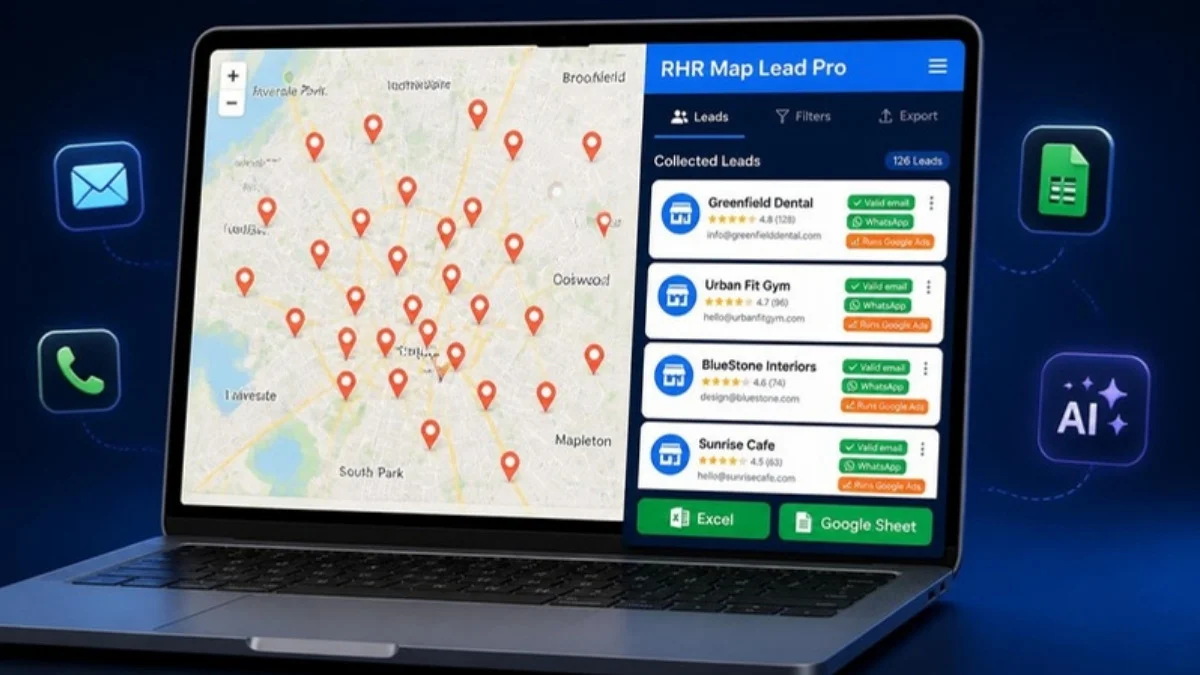
RHR Map Lead Pro is a free Google Maps scraper and lead generation Chrome extension. Type a keyword and a city and it collects every matching business from Google Maps with verified emails, phone numbers, WhatsApp, website, social links and reviews, checks who already runs Google Ads, and exports everything to Excel or Google Sheets. No signup, no credit card, no lead limits.
✔ No signup ✔ Free forever ✔ Chrome, Edge, Brave & Opera ✔ v5.0 · 223 KB
WHAT IS RHR MAP LEAD PRO?
Free Google Maps scraper Chrome extension that turns Maps into a lead list
RHR Map Lead Pro is a free Google Maps lead extractor and scraper for Chrome, Edge, Brave and Opera, built by Rubel Hasan Rokib, a Bangladesh-based Google Ads and tracking specialist. You enter one or more keywords (for example “dentist” or “AC repair”) and one or more cities. The extension opens each Google Maps search, collects the businesses that match, then visits each website and social profile to find the most-used valid email, phone and WhatsApp number.
Every lead gets a score, a lead type and optional AI notes, so you can export a ready-to-use prospect list for cold email, WhatsApp outreach, web design or ads services in a few minutes instead of copying data by hand.
FEATURES
Google Maps lead extractor features to find and qualify business leads
Built for marketers, agencies and freelancers who sell to local businesses.
Bulk keyword + city search
Add many keywords and cities, one per line. Related-keyword ideas and "only inside this location" filters keep the list relevant.
Emails from everywhere
Scans website pages, hidden page source, contact and privacy pages, the Google Business Profile, Facebook, Instagram and TikTok bios.
Email validation
Format check, fake and disposable removal, DNS/MX and domain trust. The most-used valid email is shown first as "Best Email".
WhatsApp detection
Finds real wa.me links and chat widgets, or the most-used mobile number marked "likely WhatsApp".
Google Ads detection
Checks Maps sponsored listings, the Ads Transparency Center and AW- tags to show who is running ads now or ran them before.
Tracking audit
Spots websites with no Meta Pixel or GA4, perfect prospects for tracking and conversion setup services.
AI business analyst
Optional Gemini (free tier), OpenAI or Claude key writes lead fit, pain points, a personal first line and a spam-safe email draft.
Excel, CSV & Google Sheets
Export to Excel or CSV, copy for Sheets, or send straight to your own Google Sheet with duplicate protection.
6 SMART LEAD TYPES
Find email, WhatsApp and no-website business leads on Google Maps
Choose a lead type before you start and the extension keeps only the businesses that fit your offer.
All leads
Every business that matches your keyword and location.
Email leads
Only businesses with a valid email from site, profile or socials.
WhatsApp leads
Businesses with a WhatsApp link or a mobile number.
No website
Ideal prospects for web design and landing page offers.
No tracking
Websites missing Meta Pixel or GA4 tracking.
Unclaimed profile
Google Business Profiles that are not claimed yet.
HOW IT WORKS
How to extract leads from Google Maps in 4 simple steps
Add keywords
One keyword or service per line, for example “plumber” or “dental clinic”.
Add cities
One city or area per line, for example “Dhaka”, “Dubai” or “London”.
Choose lead type
All, email, WhatsApp, no website, no tracking or unclaimed.
Collect & export
Pick 25 to 500 leads, press Start, then export to Excel or Google Sheets.
Tip: keep the Google Maps tab open and visible while it collects. Use “Safe” speed and keep each run under 300 to 500 leads to avoid Google blocks.
POPULAR USE CASES
One free tool for every Google Maps lead generation job
Google Maps email extractor
Build a cold email list of local businesses with validated emails, the best email first, and a personalised first line.
Google Maps WhatsApp lead list
Collect businesses with WhatsApp links or mobile numbers for direct WhatsApp outreach in Bangladesh, India and the Middle East.
Leads for web design agencies
Filter Google Maps for businesses with no website and pitch a website or landing page.
Leads for Google Ads and Meta Ads services
See who already runs Google Ads and which websites have no Meta Pixel or GA4, then offer ads or tracking.
Local SEO and GBP prospects
Find unclaimed Google Business Profiles and low-review businesses that need local SEO help.
B2B sales lists to Google Sheets
Scrape Google Maps business data by niche and city and send it straight to Google Sheets or your CRM.
People also search for: free Google Maps scraper, Google Maps data extractor, Google Maps business leads, Google Maps email scraper Chrome extension, scrape Google Maps to Excel, local business lead finder and Google Maps lead generation tool. RHR Map Lead Pro does all of these in one free extension.
INSTALLATION GUIDE
How to install the Google Maps lead extractor in Chrome
Works on Chrome 116+, Microsoft Edge, Brave and Opera. Installation takes about one minute.
1. Download & unzip
Download the free ZIP below and unzip it. You will get a folder named "MapLeadsPro".
2. Turn on Developer mode
Open chrome://extensions in Chrome (or edge://extensions in Edge) and switch on "Developer mode".
3. Load unpacked
Click "Load unpacked" and select the MapLeadsPro folder. Updating? Remove the old version first.
4. Pin & open
Pin RHR Map Lead Pro in the toolbar, open Google Maps and click the icon to open the side panel.
WHO IS IT FOR?
Made for people who sell to local businesses
- Digital marketing agencies and freelancers
- Google Ads, Meta Ads and SEO specialists
- Web designers looking for "no website" prospects
- Tracking and analytics consultants
- B2B sales teams and cold email outreach
- Upwork and Fiverr freelancers finding direct clients
SECURITY & PRIVACY
Safe by design, no data leaves your browser
- No remote code, strict Content Security Policy
- Scraped pages read as inert text, links sanitised
- Website crawling never sends your cookies
- API keys and leads stay in your own browser
- Google Sheet protected with a private token
- Free to use, no account or tracking required

Download the free Google Maps lead extractor today
Version 5.0 · ZIP 223 KB · Chrome, Edge, Brave & Opera · Updated October 2026
FAQ
Google Maps scraper and lead extractor FAQ
Is RHR Map Lead Pro really free?
Yes. RHR Map Lead Pro is 100% free to download and use. There is no signup, no credit card and no lead limit. The optional AI analysis uses your own Gemini, OpenAI or Claude API key, and Gemini has a free tier.
How do I extract leads from Google Maps?
Install the extension, open Google Maps, click the RHR Map Lead Pro icon, add your keywords and cities, choose a lead type and the number of leads, then click “Start collecting leads”. When it finishes, export the list to Excel, CSV or Google Sheets.
Does it find business emails and WhatsApp numbers?
Yes. It searches the business website (including hidden page source and contact pages), the Google Business Profile, Facebook, Instagram and TikTok. It validates every email and shows the most-used valid email and phone first, plus WhatsApp links or likely WhatsApp mobile numbers.
Which browsers are supported?
Google Chrome 116 or newer, Microsoft Edge, Brave and Opera. Install it with “Load unpacked” in Developer mode, as explained in the installation guide above.
Can I export leads to Google Sheets?
Yes. You can download Excel or CSV, copy data for Sheets, or connect your own Google Sheet with a one-time Apps Script setup. Duplicates are skipped automatically.
Is it safe to use?
The extension runs only code that ships inside it, uses a strict Content Security Policy, treats scraped pages as plain text and keeps your leads and API keys inside your browser. Only install the original ZIP from this page.
Is scraping Google Maps legal?
Collecting publicly listed business information is common, but you are responsible for how you use it. Follow Google’s terms and your local anti-spam and data protection rules (for example GDPR or CAN-SPAM) when contacting businesses.
How many leads can I collect at once?
You can choose 25, 50, 100, 200 or 500 per run. For best results and fewer blocks, use Safe speed and keep each run under about 300 to 500 leads.
How do I extract emails from Google Maps for free?
Install RHR Map Lead Pro, choose the “Email leads” lead type, add your keyword and city and start. The Google Maps email extractor checks each business website, Google Business Profile, Facebook, Instagram and TikTok, validates the emails and shows the most-used valid email first. It is free, with no API key needed.
Can I scrape Google Maps to Excel or Google Sheets without an API?
Yes. This Google Maps scraper works inside your browser, so you do not need the Google Places API or any paid credits. Export your leads to Excel (XLSX), CSV, or send them straight to your own Google Sheet.
Can it find businesses on Google Maps without a website?
Yes. Choose the “No website” lead type to get local businesses that have no website, which are ideal prospects for web design, landing page and SEO services. You can also filter for businesses with no tracking or unclaimed Google profiles.
Does the Google Maps lead extractor work in every country?
Yes. It works anywhere Google Maps works, including Bangladesh, India, the USA, the UK, Canada, Australia, Saudi Arabia, the UAE and Europe. Just type the city or area in the language people use on Maps.
Is this a Google Maps scraper with WhatsApp numbers?
Yes. It detects real WhatsApp links and chat widgets on business websites, and marks the most-used mobile number as “likely WhatsApp”, so you can build a WhatsApp lead list from Google Maps.
Built by Rubel Hasan Rokib
I am a data-driven digital marketer from Bangladesh with 5+ years of agency experience, an Upwork Verified Expert with 200+ happy clients. I built RHR Map Lead Pro for my own client hunting and decided to share it free. Found leads that need ads or tracking? See my Google Ads management, Google Ads conversion tracking and Meta Conversion API services, or read more guides on the blog.